Detail Keeper is a notebook you talk to. Teach it a made-up name by saying it once,
and from then on it spells that name your way. It runs on your Mac, and nothing you
say leaves it.
For Macs with Apple silicon on macOS 26 or later. The first start downloads its 3.6 GB
speech model; after that it works offline.
What's new in 0.1.6
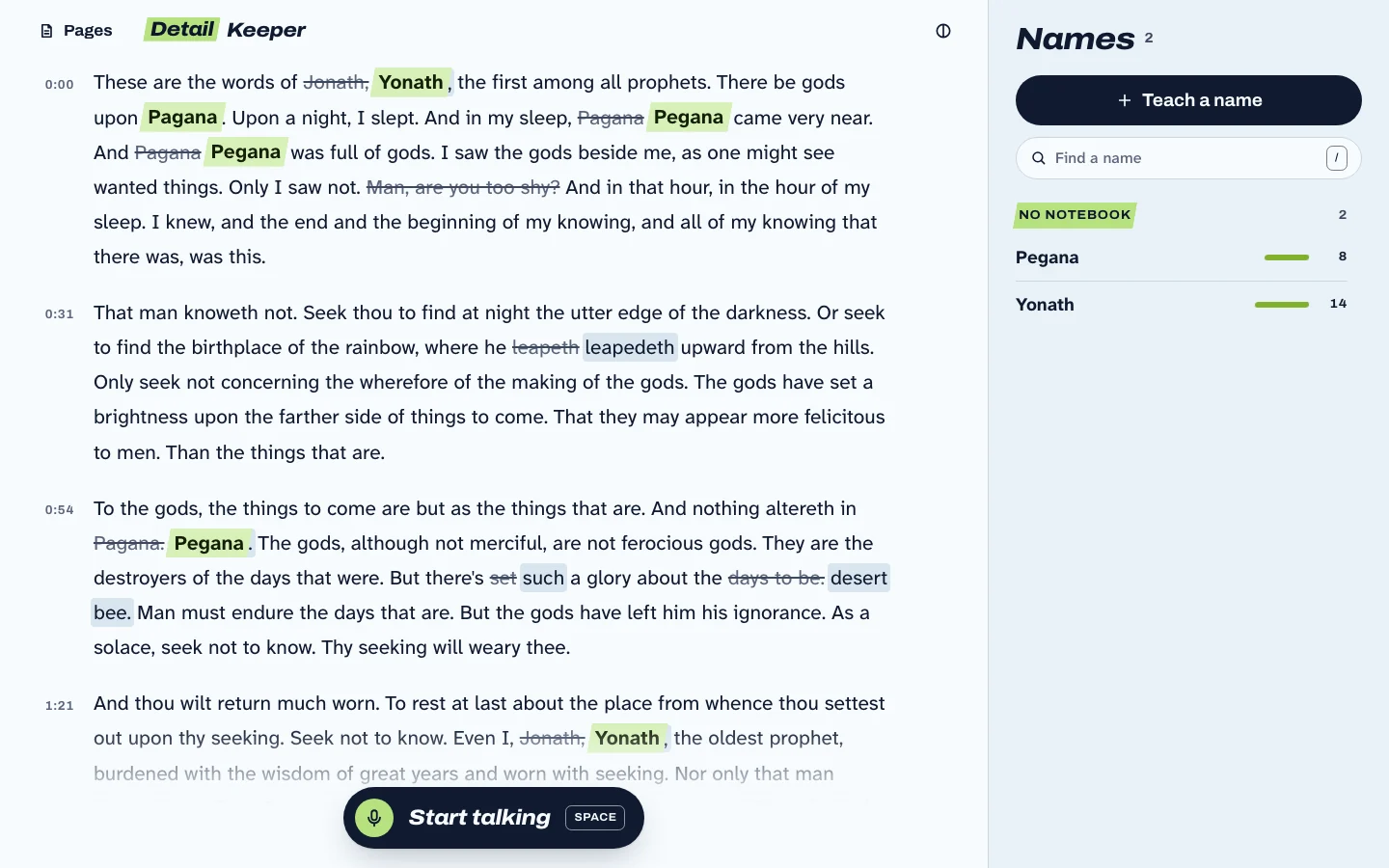
On its own, the recognizer hears
Pagana.
Detail Keeper writes
Pegana
Taught by saying it once.
One reading. Two names taught.
A public-domain LibriVox reading of Lord Dunsany's The Gods of Pegana,
after teaching it Pegana and
Yonath. Struck through is what the speech recognizer
wrote on its own; beside it, what Detail Keeper kept.
An open model, fine-tuned for names.
Detail Keeper doesn't send your voice to a cloud speech service. It writes with the open
Qwen3-ASR model and an adapter we trained ourselves: to spell a name it learned from a single recording, and to
leave names out when nobody said one.
We measure it against ElevenLabs and Deepgram on test sets sealed before our final model
existed, and publish every number, including where it loses.
Sealed audiobooks, 1,100 mentions of taught names (own-names-bench v1.3.0). The thin line is the 95% interval.
Detail Keeper on your Mac89.6%
ElevenLabs Scribe v2 in the cloud88.2%No measurable difference
Deepgram Nova-3 in the cloud78.6%Fewer right than ours
On audiobooks, Detail Keeper spells taught names as well as ElevenLabs and better than Deepgram; ElevenLabs changes slightly fewer other words. In conversations, ElevenLabs is ahead in 2 of 8 conditions, Deepgram is behind ours in 6 of 8.
A character you invented, a friend's nickname, a place in your game. Say it into the
mic one time and type how it's spelled.
Then just talk.
Talk for as long as you like. Your words land on the page as you go, with every name
you taught spelled your way.
It stays on your Mac.
The speech models run on the Mac itself. Your voice, your pages and your names never
leave it. No account, no cloud.
What's new
Detail Keeper updates itself. Here's what each release changed.
0.1.6
No more missing phrases. With some microphones, and anywhere a pause is perfectly silent, Detail Keeper could leave out a short phrase just before the pause, often one with a name in it ("took the old road north to Quorrath Keep" came out as "took the old road north."). It now writes them.
A better first recording. When you teach a name and it barely catches what you said, it now tells you and asks you to say it once more. Your new take replaces the unclear one, and names are spelled better for it.
0.1.5
Uses far less memory. Detail Keeper used to hold about 6 GB the whole time it was open. It now holds about 3.5 GB while you work, gives back what it kept only for speed as soon as you stop talking, and after ten minutes with nothing to do lets go of its speech models entirely, down to about 0.1 GB. They load again when you open a page or start recording, in well under a second on most Macs. Names and words are written exactly as well as before.
0.1.4
No more repeated sentences while you talk. A short reply between longer sentences could pick up words from the sentence after it, so that sentence was written twice. Each passage now keeps only its own words.
No more runaway lines. When the same word is said over and over, the writer could get stuck and repeat a phrase dozens of times, stalling the page for seconds. It now stops at what was really said, and writes that stretch about four times faster.
0.1.3
A first start worth waiting on. While Detail Keeper downloads its speech model, the screen shows which step it is on, a progress bar you can see move in light and dark, how fast it is downloading and about how long is left, and tips on teaching names and the shortcuts.
Tidier pages. More even spacing on empty pages, the uncertain words gathered on their own card, edits made on the words themselves, and a page takes its notebook's colour while you record.
0.1.2
Fewer names where nobody said one. A new writer (own-names v0.7.0) was trained on dense lists of look-alike and sound-alike names, so it writes a taught name into speech that has none less often, most of all when a notebook holds many names.
0.1.1
Names stay consistent. A name you taught is spelled the same way all the way through, and short replies like "yeah" or "okay" no longer turn into names nobody said.
A second listen for accuracy. A short passage is read again once what comes after it is in, with the words around it, before it settles.
Fixing a name teaches it. When you correct a word to a name, Detail Keeper keeps that bit of your voice so it gets the name right next time. Changed your mind? Undo takes the fix back.
Better from across the room. The microphone now hears you as you are, without the browser's processing, so it does better when you are further from the mic.
A hint when you are quiet. If you have been speaking softly for a while, a calm hint suggests speaking up or coming closer.
Name lists per notebook. A page in a notebook listens for that notebook's names (and names in no notebook), so one story's names don't turn up in another.